

I. Why Develop an App? Understanding the Importance of App Development, Common Platforms, and Key Design Considerations
In an era of widespread mobile device adoption, apps have gradually become a vital channel for businesses and brands to engage with users. Compared to traditional websites or social media platforms, apps not only offer a smoother user experience but also enhance user retention and interaction frequency through features such as push notifications and personalized services.
In the following sections, we will explain the importance of app development, the two major types of systems, and key design considerations to help brands make more informed decisions when planning their mobile applications.
(1) Understanding the 6 Key Reasons for App Development
In an era where smartphones are rarely out of reach, apps have become one of the best ways for brands to quickly capture users’ attention. A well-designed app not only delivers a smooth and intuitive user experience but also strengthens brand image, increases user engagement, and boosts business performance.
The 6 Key Reasons for App Development:
● Enhance Brand Loyalty: Ensure the brand remains a constant presence in users’ daily lives, increasing usage frequency and familiarity.
● Improve User Experience: Combine mobile-specific features with smartphone capabilities to provide intuitive and convenient workflows.
● Drive Conversions: Streamline the purchasing process to increase purchase rates and the success rate of service bookings.
● Proactive Push Notifications: Deliver real-time promotions, updates, or event information to increase engagement and encourage repeat visits.
● Appearing on Download Charts to Increase Visibility: Gain exposure through platform traffic to attract more potential users.
● Strengthening Brand Professionalism and Uniqueness: Enhance brand recognition and professionalism through customized interfaces and features.
(2) The Two Major App Development Platforms: iOS and Android
When planning app development, it is essential to first understand the major operating systems currently on the market. Different systems will impact development methods, feature implementation, and target user demographics. Generally, apps on the market are primarily divided into two major platforms: iOS (Apple) and Android (Google):
🖥︎ iOS
Developed by Apple, iOS is exclusive to devices such as the iPhone and iPad. iOS users tend to be high-spending consumers. The system is highly closed, with strict development standards, resulting in apps that are typically more stable and secure. For brands, iOS apps can effectively project a professional image and easily gain exposure through the App Store.
● Compatible Devices: iPhone, iPad
● Programming languages: Swift or Objective-C
● Advantages: Higher user spending power, low system fragmentation, and unified updates
● Disadvantages: High development barriers, strict App Store review process
🖥︎ Android
Android, led by Google, is used on smartphones and tablets of various brands and specifications. It holds a high market share and has a widely distributed user base. Android development is relatively open, supporting diverse features and devices; however, it requires optimization for different brands and screen sizes to ensure a consistent user experience.
●Supported Devices: Android phones and tablets from various brands
● Programming languages: Kotlin or Java
● Advantages: High market share, relatively low development costs
● Disadvantages: Wide variety of device models and screen sizes, resulting in significant testing and optimization workloads
The table below provides a quick comparison of the differences between iOS and Android systems.
Item | iOS | Android |
|---|---|---|
Development Language | Swift/Objective-C | Kotlin/Java |
Platforms | App Store | Google Play |
Testing Difficulty | Low | High (requires testing on multiple devices) |
Review Process | Strict; longer time required for release | Less strict, faster release |
User demographics | ● High-spending demographic ● High brand loyalty | ● High market share ● Large user base |
(3) Master the 4 Key App Design Principles
1. Ensure Smooth User Experience
When designing an app, ensure that features are clearly categorized and place key functions in prominent locations so users can quickly find what they need. Additionally, ensure fast loading speeds, natural and smooth animations and transitions, and avoid crashes or frequent error messages to guarantee stability and a positive user experience.
2. Maintain Consistent Brand Visuals
As an extension of the brand, the app’s interface design should maintain consistency in brand colors, fonts, and icon styles. This allows users to experience the brand’s tone directly within the app, enhancing both professionalism and brand recognition.
3. Ensure Security and Privacy
In an era of growing awareness regarding personal data protection, security has become a fundamental requirement for apps. During the design process, ensure the security of user data by implementing measures such as login verification mechanisms (e.g., two-factor authentication), encrypted data transmission, clear privacy policy statements, and transparent permission requests (e.g., for camera and location access).
Robust security and privacy design not only builds user trust but also helps avoid negative word-of-mouth and legal risks.
4. Having an App Performance Data Dashboard
The app should feature a comprehensive data analytics backend, including metrics such as user downloads and engagement, behavioral tracking (clicks, dwell time), conversion rate analysis, and push notification performance tracking. Through these data insights, brands can continuously optimize interface design and marketing strategies to enhance overall app performance and user experience.
Choose ROLLLL DESIGN,
II. How to Choose an App Development Tool? Understanding the 3 Major App Development Types and Selection Criteria
Different app development approaches not only impact feature implementation, development costs, and launch speed but also determine the ease of future maintenance and the user experience. The market primarily offers three types: native, web, and hybrid, each with its own advantages and limitations.
Below, we’ll take you through the key features of these three major app development types and outline selection criteria to help businesses and developers create mobile apps that balance performance and user experience based on budget, functional requirements, and target audience.
(1) Three Common Types of App Development Tools
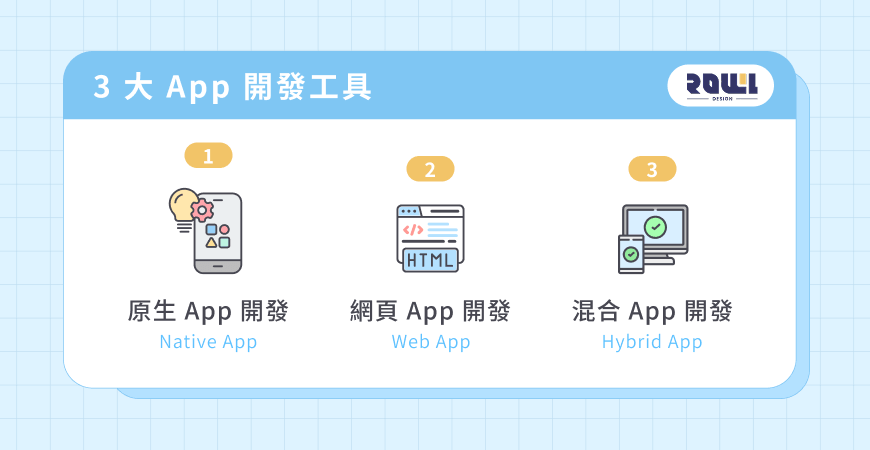
1. Native App Development
Native apps are applications developed using specific programming languages and development tools tailored to different operating systems. For example, iOS uses Swift or Objective-C, while Android uses Kotlin or Java. To support both iOS and Android, two separate codebases are typically required.
Therefore, native apps are better suited for large enterprises with high performance requirements, complex functionalities (such as games or high-end graphics software), or ample budgets, as they offer the best user experience and deep system integration capabilities.
● Advantages: Excellent performance, smooth operation, strong
compatibility ● Disadvantages: Higher development and maintenance costs and time
2. Web App Development
Web apps are browser-based applications developed using web technologies such as HTML, CSS, and JavaScript. Users do not need to download the app; they can access it directly via a URL. Consequently, development and maintenance costs are relatively low, and cross-platform support is straightforward.
Web apps are particularly suitable for content-based platforms (such as news sites and blogs), startups with limited budgets, or as test versions prior to launching a native app, enabling rapid validation of features and user needs.
● Advantages: Lower development costs; no download required
● Disadvantages: Slower performance; cannot fully utilize mobile hardware features
3. Hybrid App Development
Hybrid apps combine the characteristics of native apps and web apps. They are typically developed using web technologies and then packaged into apps that run on iOS and Android through frameworks such as React Native or Flutter.
This development approach not only enables rapid multi-platform support but also involves relatively lower development and maintenance costs. It is particularly suitable for enterprises, e-commerce platforms, or social media apps—especially for brands aiming to quickly capture market share while balancing functionality and user experience.
● Advantages: Development speed falls between native and web apps; costs are lower than native development; can be released on both platforms simultaneously
● Disadvantages: Some advanced features require additional handling
(2) How to Choose the Right App Development Tool?
When selecting app development tools, in addition to considering technical differences, you should also evaluate overall business needs and operational aspects. The costs, integration capabilities, launch speed, and ongoing maintenance burden of different development approaches can impact project outcomes, so it is essential to consider all factors comprehensively before planning.
We recommend evaluating the following five key aspects:
● Budget: Select the most suitable development approach based on available funds for development and maintenance. For example, native app development is more expensive, while web apps or hybrid apps can reduce initial investment costs.
● Project Complexity: The level of functional requirements, system integration, and user experience expectations will influence the choice of development approach and technical difficulty.
● Time to Market: If you aim to launch quickly to validate the market, hybrid or web apps can shorten the development cycle; if performance requirements are extremely high, native apps should be considered.
● Target Market: Consider the operating systems and device preferences of your primary user base. If your target audience primarily uses iOS, prioritize developing a native iOS app; if you aim to reach a broader market, consider cross-platform support or hybrid development.
● Long-Term Maintenance and Scalability: After launch, the app will require ongoing feature updates and system maintenance. It is recommended to evaluate the ease of future feature expansion, system updates, and multi-platform maintenance, and select development tools that balance cost-effectiveness with long-term growth.
III. How Long Does App Development Take? A Guide to the App Development Process
App development time is not fixed and is influenced by various factors, including project scale, feature complexity, design requirements, and the efficiency of communication and review processes. Generally, it takes approximately 1 to 6 months or even longer. Below, we’ll walk you through the complete app development process, covering all stages from requirements analysis, design, and coding to testing and launch, to help businesses or development teams accurately manage timelines and progress when planning a project.
(1) App Development Timeline
The timeline for app development primarily depends on the complexity of features, the development technology (native, web, or hybrid), and the scale of the backend management system. Generally, projects can be categorized into three types based on their scale:
✦ Small Apps (approx. 1–3 months)
Small apps have relatively simple functionality, primarily focused on information display, content presentation, or lightweight interactions, such as company profiles, event information, or simple content platforms. The development process is relatively straightforward, with shorter design and coding cycles, typically allowing for launch within 1–3 months.
Common examples: simple tools (such as flashlights or calculators), purely informational apps (such as brand introductions or electronic product catalogs), or static content apps without a membership system.
✦ Medium-Sized Apps (approx. 4–6 months)
Medium-sized apps offer more comprehensive functionality, potentially including membership systems, shopping workflows, booking features, or basic interactive functions, and require a simple backend management system. The development process involves requirements analysis, UI/UX design, front-end and back-end development, and testing, with a total timeline of approximately 4–6 months.
Common examples: e-commerce shopping apps, brand member centers, basic social platforms, or appointment booking systems.
✦ Large-Scale Apps (6 months or more)
Large-scale apps feature complex functionality, requiring the integration of multiple services, high-performance computing, or a comprehensive backend management system. Examples include games, social media platforms, or large-scale enterprise projects in finance and e-commerce. The development process covers detailed requirements analysis, interface and feature design, native development across multiple platforms, comprehensive testing, and deployment, with a development cycle typically exceeding 6 months.
Common examples: large-scale mobile games, food delivery/ride-hailing platforms (including real-time mapping and route calculation), financial payment tools (with high-precision cybersecurity requirements), etc.
(2) The 6 Major Stages of App Development
App development is a systematic process; every stage, from requirements discussion to post-launch maintenance, impacts the final product’s quality and user experience.
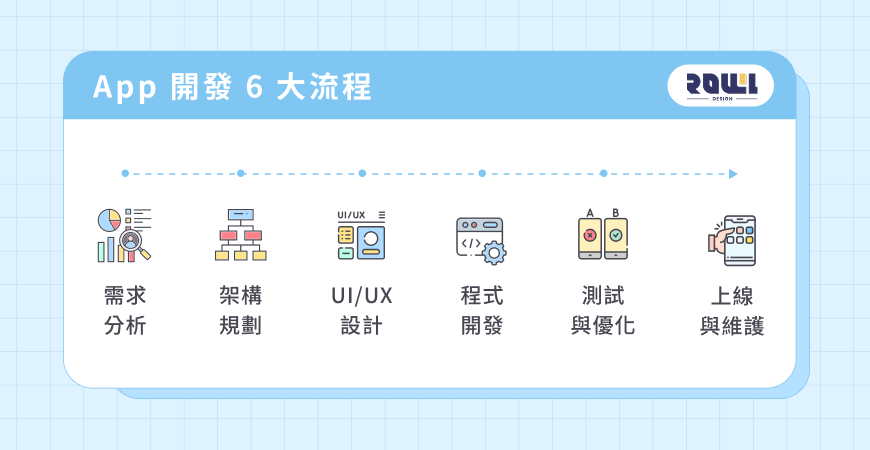
STEP 1|Requirement Analysis: Clarifying Objectives and Product Positioning
Through in-depth discussions with clients regarding business objectives, target audience, and core features, we clarify “why this app is being developed.” By clearly defining the product’s core value, project direction, and success metrics, we ensure subsequent development has a clear objective, avoiding deviations from the intended path or wasted resources.
● Confirmation of business objectives (traffic generation, conversion, member management, brand exposure, etc.) ●
Target audience profiling and usage scenario analysis (target audience behavior, pain points) ●
Core features and product positioning ● Competitor
analysis and market opportunity assessment
STEP 2 | Architecture Planning: Establishing the Product Blueprint and Technical Foundation
Once requirements are clearly defined, abstract concepts must be translated into a concrete architecture to ensure the product’s logic is complete and practically implementable. This phase also considers the app’s functional structure, user flow, and data architecture, while selecting the appropriate technology stack (native, web, or hybrid) to ensure system stability and scalability.
STEP 3|UI/UX Design: Creating an Intuitive and Consistent User Experience
The design team creates wireframes and visual mockups to confirm operational logic and brand style, delivering an intuitive and consistent user experience. Through iterative testing and refinement, we ensure users can quickly understand the interface and smoothly complete all tasks. ●
UI (User Interface): Creating visually appealing interfaces that align with the brand style to enhance visual consistency.
●UX (User Experience): Analyze user needs and workflows to optimize information architecture and interaction logic, improving usability and fluidity.
●Interaction Design and Detail Optimization: Design buttons, animations, and feedback effects to enhance intuitive operation and the overall user experience.
STEP 4 | Development: Transforming Designs into a Functional Product
Front-end and back-end development proceed simultaneously, including database creation and API (Application Programming Interface) integration, to bring the design and functionality to life. ●
Front-end Development (Visual Presentation and Interactive Features) ●
Back-end Development (Logic Processing, Membership System, Data Management) ●
Database Creation and API Integration ●
Third-Party Service Integration (e.g., Payment Gateways, Push Notifications, Login Systems)
STEP 5|Testing and Optimization: Ensuring Stability and User Experience
Before the official launch, comprehensive testing must be conducted across multiple dimensions, including functionality, performance, user flow, and device compatibility, to identify potential issues and refine details. Thorough testing ensures the app runs stably and reliably, preventing any negative impact on user experience and brand trust.
STEP 6|Launch and Maintenance: Continuous Optimization and Long-Term Management
Launching the app is not the end; it marks the beginning of continuous product optimization. Web apps must be deployed to the official website, while native apps must be submitted to the App Store or Google Play for release. After launch, we will continuously update and optimize features based on data monitoring and user feedback to ensure stable system operation and maintain the product’s competitiveness.
Leave it to ROLLLL DESIGN LIMITED,
IV. How Much Does App Development Cost? A Summary of Factors Affecting Development Costs and Common Price Ranges
There is no fixed standard for app development costs; prices vary depending on feature requirements, development methods, design complexity, and the scope of ongoing maintenance. Below is a summary of common factors affecting pricing and typical cost ranges to help you better plan your budget.
(1) 6 Common Factors Affecting App Development Costs
1. Development Labor Costs
A comprehensive app development project typically requires a full team, including a project manager, UI/UX designers, front-end engineers, back-end engineers, and testers. The larger the team and the higher their level of expertise, the higher the development costs will be.
2. Functionality Complexity
The more features an app has and the more complex its logic, the greater the time and cost required for development. For example, if you want the app to include basic information display, a membership system, payment integration, real-time chat, or a customized backend system, each of these features increases development difficulty and consequently affects the overall cost.
3. Choice of Development Technology
The choice of app development technology directly impacts development costs: ●
Native Development: iOS and Android must be developed separately, doubling the required manpower and time, resulting in the highest costs.
● Hybrid Development: Cross-platform technologies (such as Flutter) allow a single codebase to work on both platforms, resulting in moderate costs. ●
Web App: Converted using web technologies, resulting in the lowest costs.
4. Level of UI/UX Design Sophistication
Using standard components and templates keeps design costs lower. However, if extensive custom animations, interactive designs, or original illustrations are required, design hours and costs will increase significantly.
5. App Store Submission Fees
After development is complete, registering a developer account and paying the relevant fees is required to officially publish the app to app stores. For example, the Apple App Store annual fee is $99; the Google Play Store one-time registration fee is $25.
6. Maintenance and Update Services
Launching the app is not the end of the project but the beginning of ongoing operations. Long-term maintenance ensures the app continues to run stably and provides the best user experience. Maintenance typically includes launch support, server configuration, regular feature updates, and security maintenance, so costs will increase accordingly.
(II) Price Ranges for App Development Items
When planning an app budget, understanding the cost ranges for each item helps businesses manage cost allocation and assess return on investment. Based on common development pricing models, app development costs can generally be broken down into the following items and price ranges:
Item | Price Range |
|---|---|
UI/UX Visual Design | HKD 10,000–200,000 |
Front-end Development | HKD 20,000–800,000 |
Back-end Development | HKD 50,000–500,000 |
Functional Testing | HKD 5,000–50,000 |
App Store Submission Fee | iOS: USD $99/year Android: USD $25 (one-time fee) |
Annual System Maintenance Fee | Approx. 5–15% of total development cost |
V. Avoid Pitfalls! 5 Essential Considerations Before App Development
Before diving into app development, many businesses or startup teams often waste time and money due to insufficient preparation. Below are the top 5 must-know considerations before app development, including conducting market research, establishing a development timeline, ensuring performance and quality, avoiding disorganized workflows, and continuously optimizing and updating the app. These steps ensure a smooth development process and help create a competitive app that meets market demands.
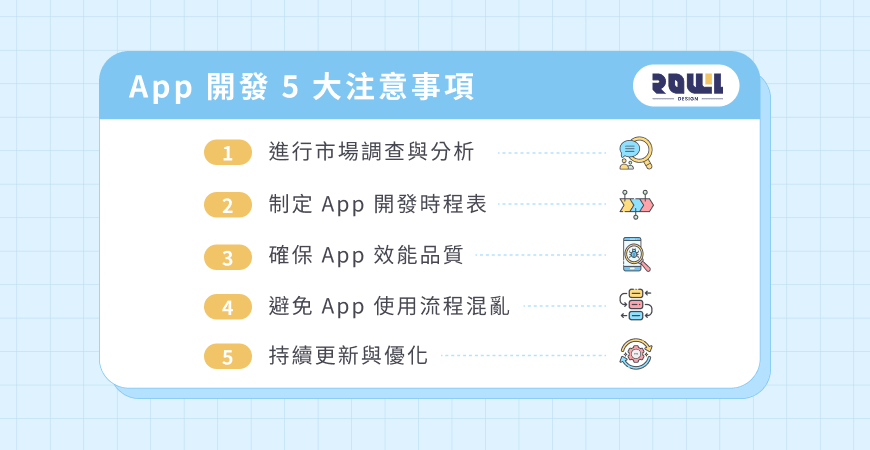
(1) Conduct Market Research and Analysis
Before starting app development, you should first gain a thorough understanding of the market environment and user needs. For example, analyzing the features and user flows of competing apps helps identify common market practices and their pros and cons. Additionally, researching the usage habits and preferences of your target audience aids in designing features and interfaces that meet user expectations. By identifying unique selling points and potential opportunities in the market, your app can stand out in a highly competitive landscape.
(2) Establish an App Development Timeline
A clear development timeline effectively prevents project delays and uneven resource allocation. It is recommended to clearly divide the development process into distinct phases, such as requirements analysis, UI/UX design, front-end and back-end development, testing, and launch, and set estimated completion dates for each phase. At the same time, buffer time should be allocated to accommodate feature modifications, interface adjustments, or test corrections, ensuring the project is completed on schedule.
(3) Ensuring App Performance and Quality
App performance and operational fluidity directly impact user satisfaction and retention rates. Therefore, comprehensive testing should be conducted throughout the development process to ensure the system is stable and reliable.
● Functional Testing: Ensure that every feature operates as expected to avoid errors or anomalies.
● Compatibility Testing: Verify that the app runs smoothly on different phone models and operating system versions.
● Performance Testing: Ensures the app launches quickly, scrolls smoothly, and avoids crashes or lag.
● Security Testing: Protect user data security, including data encryption and permission controls.
(4) Avoid Confusing App Workflows
Many apps fail due to overly complex registration processes, menu structures, or feature designs, making it difficult for users to quickly find the services they need. Therefore, when developing an app, it is recommended to provide a simple, intuitive, and seamless user flow so that users can quickly complete tasks and meet their needs.
Design considerations:
● Ensure the user flow is intuitive so users can quickly find the features they need.
● Ensure visual design aligns with the brand image and maintains interface consistency.
● Provide clear interactive feedback, such as button click responses or loading animations.
● Categorize features clearly to prevent users from getting lost or becoming confused.
(5) Continuous Updates and Optimization
Launching the app does not mark the end of the project; continuous updates and optimization are crucial for maintaining market competitiveness. We recommend consistently gathering user feedback, tracking relevant metrics (such as active users, feature usage rates, and conversion rates), regularly fixing bugs and releasing updates, and introducing new features as appropriate to ensure the app remains attractive and competitive over the long term.
6. Can You Teach Yourself Mobile App Design? Answers to 4 Common App Development Questions
Q1: Can you teach yourself mobile app development?
Yes. There are abundant online learning resources available today, such as video tutorials on YouTube or official resources like Apple’s Swift Playgrounds and Google’s Android Codelabs, which allow you to learn programming languages, interface design, and basic feature implementation step by step.
Q2: Should I teach myself app development or hire a professional web development company?
Before making a decision, consider factors such as cost, quality, time to market, and technical integration.
● Self-study: Lower financial cost, but requires a significant time investment. Feature integration and time-to-market are slower, so it may not be suitable for commercial use or multi-platform support.
● Professional company: Costs are higher than self-learning, but they provide a stable user experience and full functionality, and can assist with integrating payment systems, backends, or third-party systems, ensuring greater development efficiency and reliable ongoing maintenance.
In short, if you’re simply learning for personal use or creating a small project, self-learning is a viable option. However, if the app is intended for commercial use, requires long-term maintenance, or needs multi-platform support, seeking assistance from a professional company is recommended for greater security and reliability.
Q3: What are the pros and cons of cross-platform app development?
Cross-platform development (such as Hybrid, React Native, and Flutter) supports both iOS and Android, allowing you to cover two platforms with a single development effort, effectively saving time and costs. However, it’s important to note that performance may be slightly lower than that of native apps.
For brands looking to quickly validate the market, reduce initial project costs, or build an e-commerce shopping app, cross-platform development is currently the preferred solution offering the best value for money, thanks to its lower costs compared to native apps and the ability to launch simultaneously on both platforms.
Q4: How should the app be promoted after launch?
Post-launch promotion strategies will impact download volume and user engagement. We recommend focusing on the following four areas:
● App Store Optimization (ASO): Design appropriate titles, descriptions, and keywords, and pair them with high-quality screenshots and promotional videos to increase search visibility and download intent.
● Social Media and Digital Marketing: Utilize platforms like Facebook, Instagram, and TikTok, or collaborate with bloggers and KOLs to increase visibility and word-of-mouth promotion.
● Content and Feature Appeal: Provide clear incentives for downloading, such as sign-up bonuses for new users, app-exclusive limited-time events, or a well-designed onboarding process.
● Data Tracking and Iteration: Analyze metrics such as download volume, retention rates, and active users, then optimize features and push notification strategies based on the results to continuously improve the user experience and business outcomes.
VII. Recommended App Development Partner: [ROLLLL DESIGN]—Unlocking Endless Possibilities
Apps are no longer just a “nice-to-have” for brands or businesses; they are a vital bridge for building deep connections with consumers. However, app development is no easy task. From strategic planning and platform selection to interface design—which directly impacts user retention—every step is interdependent.
We recommend entrusting your project to “ROLLLL DESIGN,” where our professional team will assist you throughout the entire planning process to strengthen your brand’s service capabilities and digital competitiveness.
"ROLLLL DESIGN" boasts a comprehensive development team and extensive project experience. By patiently listening to client needs and brand philosophies, we provide a one-stop service—from market demand analysis, UI/UX design, and front-end/back-end integration to post-launch maintenance and ongoing updates—helping brands transform creativity into tangible results and build a custom app.
In addition to app design and development, ROLLLL DESIGN also offers website/online store design, mini-program development, and system creation services, seamlessly blending aesthetic design, smooth user experiences, and robust technical performance. Furthermore, we assist brands with custom software development and Enterprise Resource Planning (ERP) systems, transforming business logic and workflows into efficient, automated digital systems to enhance operational efficiency and create maximum business value for our clients.
"ROLLLL DESIGN" 4 Core Services and Features:
● Brand Building: From graphic design to comprehensive brand identity, we help create a professional and consistent brand image.
● Platform Development: Custom development of corporate websites, e-commerce platforms, apps, and mini-programs to meet a wide range of business needs.
● Digital Marketing: Targeted advertising on Facebook, Instagram, and Google to drive business growth and brand exposure.
● Technical Support: We provide reliable system maintenance and technical consulting services to ensure the long-term stability of your website.
Choose ROLLLL DESIGN,

High Traffic but Zero Orders? 5 Critical Mistakes in "Website Page Design" That Are Causing You to Lose Customers
Is your website getting daily traffic, but no one is requesting quotes or placing orders? The latest conversion rate analysis for 2026 will help you identify 5 critical flaws in your “website design” that are causing you to lose customers. Improve your layout right away and turn that traffic into revenue! ...
Website Page Design , Website Traffic
What Pitfalls Are Hidden in “Web Design Packages”? 4 Real Metrics for Evaluating Hong Kong Web Design Companies
Are “Web Design Packages” Priced at a Few Thousand Yuan Really a Good Deal? We expose common hidden fees and template traps in 2026. We’ll teach you 4 key metrics to properly evaluate Hong Kong web design companies and avoid the hassle of having to redo your website!...
Website Design Packages , Website Design Prices
2026 Corporate Website Redesign Guide: What’s the Difference Between a Custom-Designed Website and a Traditional Template-Based Website?
Does your business need a website redesign? This article breaks down the latest web design standards for 2026 and provides a practical roadmap. Learn why partnering with a professional web design agency that offers custom system development can help you move beyond cookie-cutter website packages and build a high-conversion digital asset....
Website Redesign , Website Redesign , Web DesignHelp you solve company IT transformation challenges,
All types of functional websites/Apps/systems can be created!
If you have any production needs, please contact us,
We will provide free consultation for your needs.
- # Good service ≠ More expensive
- # Professional IT team, improve website effectiveness
- # Proper planning, tailor-made IT solutions
Popular Articles

From Idea to App Store: Your 2026 App Development Roadmap
16121
The 2026 Hong Kong Digital Marketing Playbook: Your Guide to Outpacing the Competition
8781
Beyond WordPress: Understanding What Truly Defines an Enterprise CMS
7088
A Beginner's Guide to System Development: An Overview of the 7 Key Processes, Common Development Models, and Cost Components
5499
Don't let an outdated website make your company seem old-fashioned to customers
4737